
Count each strain as you unpack, and nothing is filled in for you
Checking in a delivery is rebuilt around the box in your hands: each strain is a row you count up or down, and the line adds itself up. Nothing is added to Products until you finish, no strain type is filled in that nobody chose, and boxes, fractions and damaged items on an order are kept the way you said them.
A beta release note. Cultivar is in private beta, and this was written for the shops and the team testing it.
Worth testing first
If you only have twenty minutes, these are the changes most likely to affect your day, and the ones where we would most like to hear if something feels off.
- Count a box of mixed strainsOpen an ordered purchase order and press Receive. On a line with several strains, press Add a strain, pick or type each name, and count it with − and +. The line shows how many are counted and how many are still to go.
- Change your mind on a line, then reloadPress Wrong item? and pick something else, then reload the page or open it on another phone. The line stays on what you picked, and finishing puts the stock there and nowhere else.
- Set up a new product, then drop itMake a line a new product, then use Wrong item? to change it to something you already sell. Finish the delivery: the product you dropped is never created.
- Leave the strain type blankAdd a new strain without tapping a strain type. It arrives as Not sure, never Sativa or Hybrid, and waits in Products → Waiting to be listed with No strain type and No THC % until someone fills them in.
- Paste a list with boxes and fractionsTry “6 boxes of 50”, “½ lb” or “10 x 1g”. Each line keeps its box and amount, and the next list from the same supplier comes back with the same boxes.
- Mark part of a delivery damagedUnder Short or damaged, mark some of a line as damaged. The order and the receipt show the credit owed by the supplier, and the order total stays what you were billed.
Checking in a delivery, strain by strain
The old line card had you tick strains in a checklist, then open Details on each one. On a phone, with a box in your hands, that was too many steps, and a line changed to another product could still put its stock into the first one.
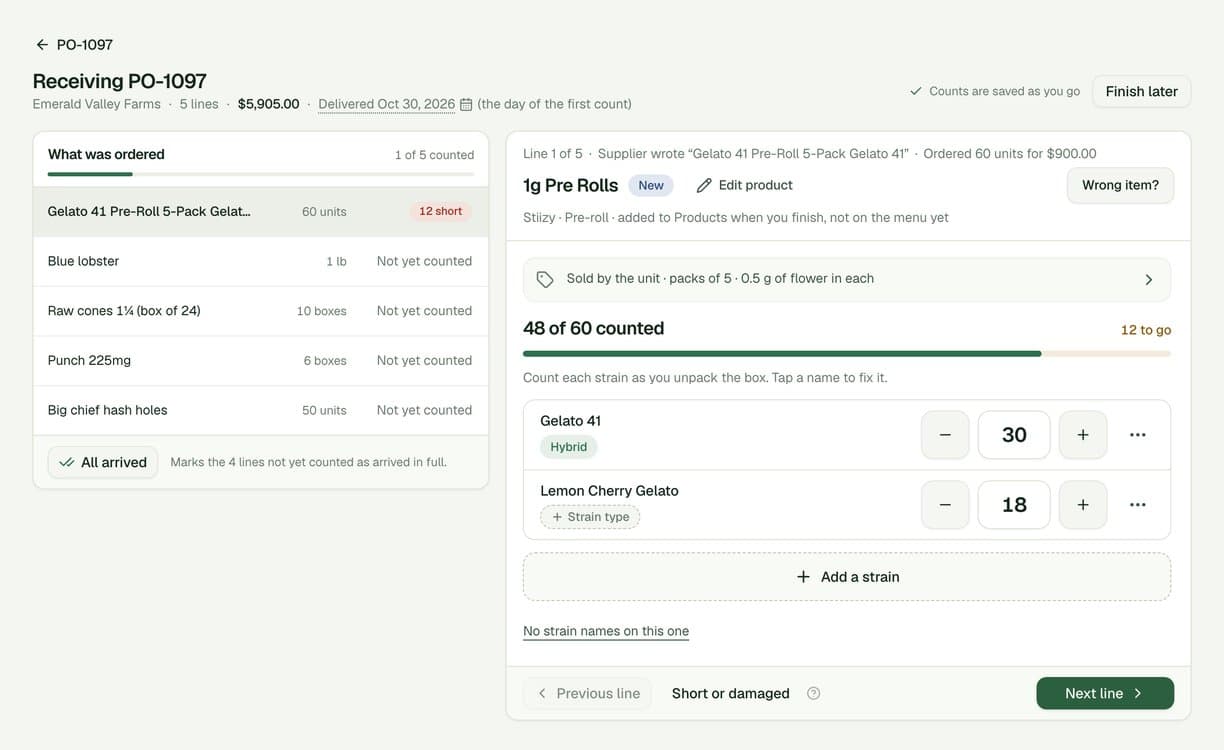
- Each strain is a row you count. Every strain on a line has its own − count +, and the rows add up to the line: 48 of 60 counted, 12 to go. There are no checkboxes to tick first.
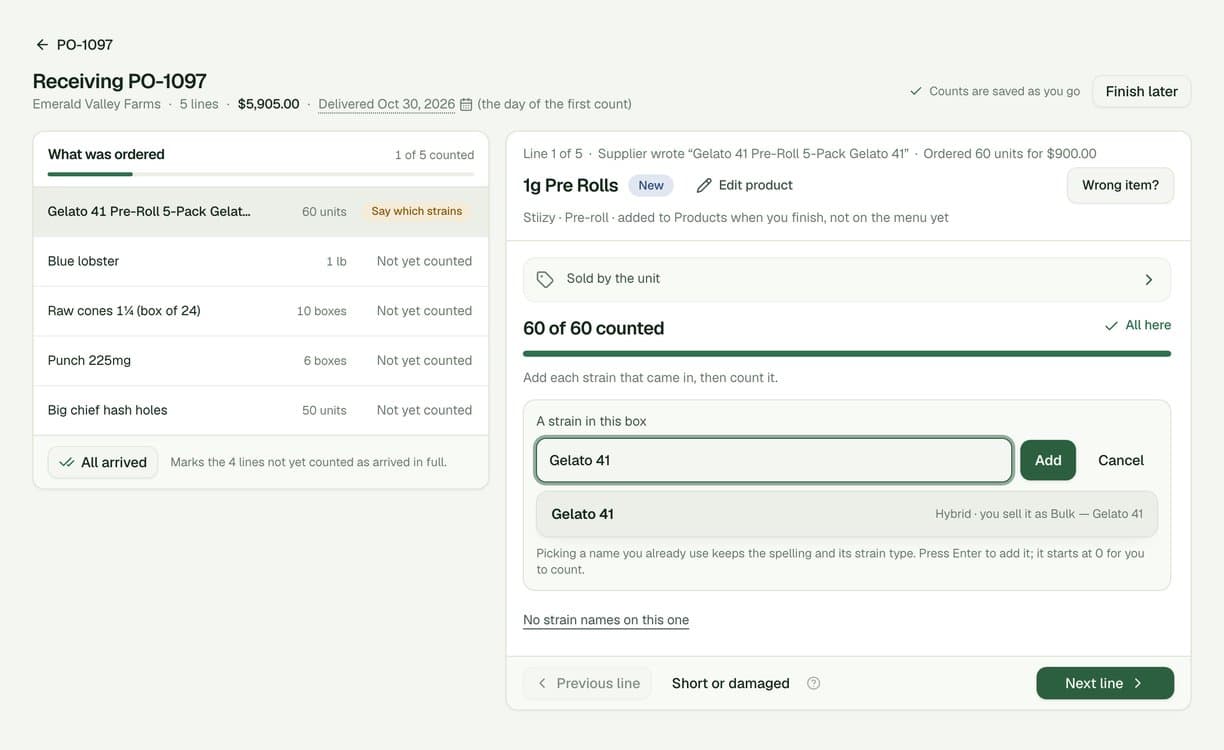
- Add a strain suggests names you already use. Picking one keeps its spelling and its strain type. Tap a strain’s name to fix a typo.
- Strain type is one tap, and optional. Indica, Sativa, Hybrid, Indica-dominant, Sativa-dominant or Not sure, here and everywhere else in the app. Nothing is copied from another strain or filled in by default.
- Wrong item? changes what a line is. Your choice is saved straight away and kept after a reload or on another device. Finishing never falls back to what the order said.
- Edit product sits next to the product’s name. It is there only for a product that is new on this delivery. One you already sell shows Open product instead.
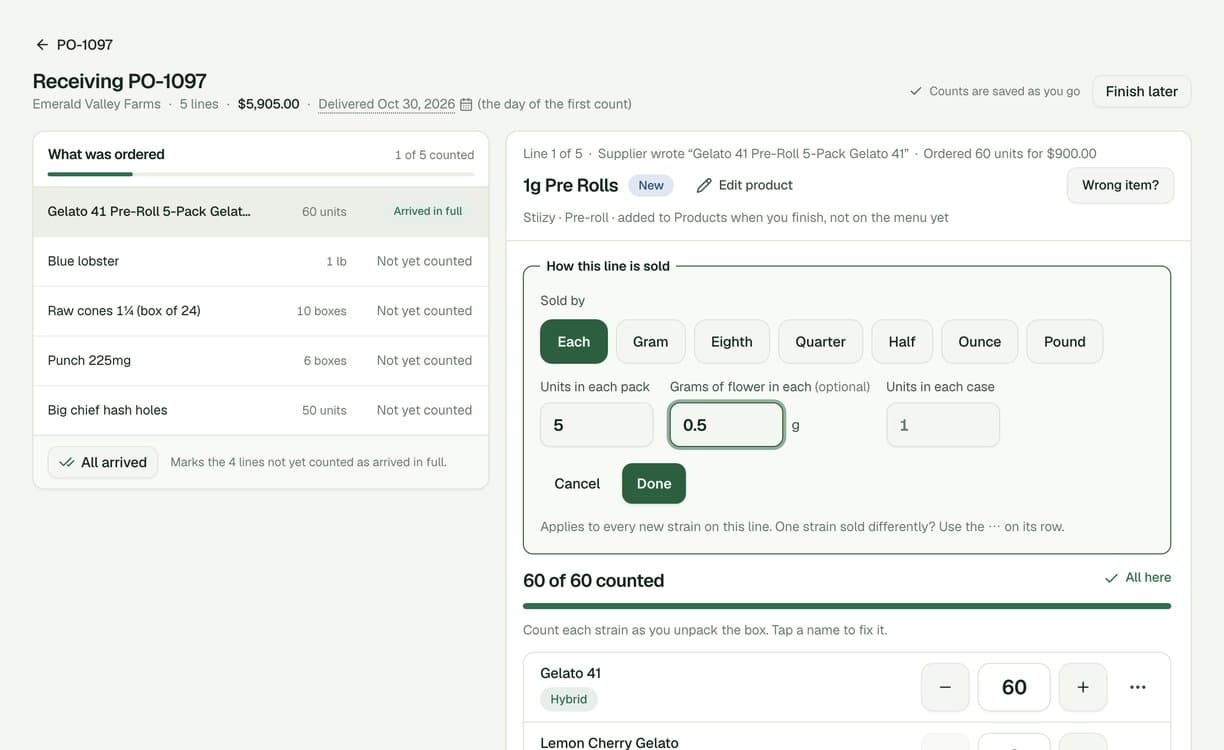
- How it is sold is one line. For example “Sold by the unit · packs of 5 · 0.5 g of flower in each”. Tap it to change the whole line; one strain sold differently uses the ··· on its row.
- Weight is never required. Grams of flower in each is asked only for pre-rolls, and it is optional. A production run that needs it asks for it there.
- Papers, cones and other accessories get one count. How many boxes arrived, with no strains to sort out.
- Nothing is added to Products until you finish. A new product or strain set up on a line stays on the delivery until Add to stock. Change your mind before then and it is never created.
- A line the order already matched opens on its strains. No need to say again which item it is.
- Uncounted lines with several strains are not guessed. Next line and All arrived no longer mark them as arrived in full, because nobody knows which strain the units belong to. A line with one strain still takes one press.
- The review matches what is added. It is read again before you see it, and if someone changed a line while you were reviewing, you are told who and asked to check it again.
- Mixed units on one line are flagged. A line counted partly in grams and partly in units has to be fixed before you can finish, and says why.
Purchase orders
- Pasting a list matches the product. A strain is only kept when we are sure of it. Otherwise it shows as a hint, like Blue Lobster?, which receiving offers first.
- Boxes stay boxes. “6 boxes of 50” is remembered for that supplier and comes back next time, and “box of 50” typed on the order page keeps its 50.
- Quantities read the way you write them. “1/2”, “½”, “half lb” and “10 x 1g” all work. A cell we cannot read says why.
- A damaged box is credit owed. The order and the receipt show Credit owed by the supplier, with the amount. The order total stays what you were billed.
- A quiet price check. When the price of one is far above what that product usually costs, the line asks “A box of 50?”, in case it is the price of a box.
- One order open in two tabs. Only what you changed is saved, so an older tab can no longer overwrite a newer one or bring back rows you deleted.
- No false “order not placed”. If placing an order is slow to answer, we check whether it went through before telling you it did not.
- One way to match a line. The same picker on a new order and on the order page: the product first, the strain if you know it.
- Every open delivery is in Needs you. As Finish checking in, with the order number.
Products and listing
- Accessory is a new product type. For papers, cones and batteries. It is never asked for a strain, a strain type or THC. Create Product no longer starts on a type you did not pick.
- Waiting to be listed catches more. No strain type and No THC % keep a product waiting, and each chip opens the size that needs it.
- The same size cannot be added twice. You are told which size already exists.
- Copied prices stay Suggested. A price copied from another size is marked Suggested until someone types it or confirms it.
- Edibles start THC in mg. Everywhere a size is created, including at a delivery.
- Fewer questions that do not apply. Brand is optional everywhere, and raw materials are never asked for a price, a description or the storefront.
- The storefront preview shows what just arrived. Sizes not on sale yet are marked as such.
- Smaller things. A count on Products in the sidebar, Opening balance for a product’s first stock, and list pages that fit a phone.
Demo data
- The switch turns on at once. Your sandbox is now prepared ahead of time. The very first time, the switch says Getting your sandbox ready… and turns on by itself, usually within a minute, instead of loading forever.
- Reset waits the same way. Resetting the sandbox from Settings shows the same progress and finishes on its own.
Early work on an assistant
- Not in your app yet. We have begun setting up the groundwork for an AI assistant inside Cultivar, and it is in early beta testing on our own machines only. Nothing is switched on in your account, and you will hear from us before that changes.
This release is still being tested, so this page will grow. If a box will not check in the way it arrived, tell us what was in it.