
Order in your supplier’s words, decide what it is when the box is open
Placing a purchase order no longer adds anything to Products. Each line keeps your supplier’s wording until the delivery arrives, and checking it in is where you say what it is: a strain you already sell, a new strain of a product you have, or something new. A purchase order’s total stays what you paid, whatever happens to the stock afterwards.
A beta release note. Cultivar is in private beta, and this was written for the shops and the team testing it.
Worth testing first
If you only have twenty minutes, these are the changes most likely to affect your day, and the ones where we would most like to hear if something feels off.
- Place an order and check ProductsPaste a supplier’s list into a new purchase order and mark it as ordered. Then open Products: nothing new is there. The order keeps each line exactly as your supplier wrote it.
- Say what each line is at the deliveryOpen the order and press Receive. On each line, Which item is this? offers something you already sell, a new strain or flavour of a product you have (New strain of AAA Flower), or a new product. Your supplier’s words stay on the line, small, for reference.
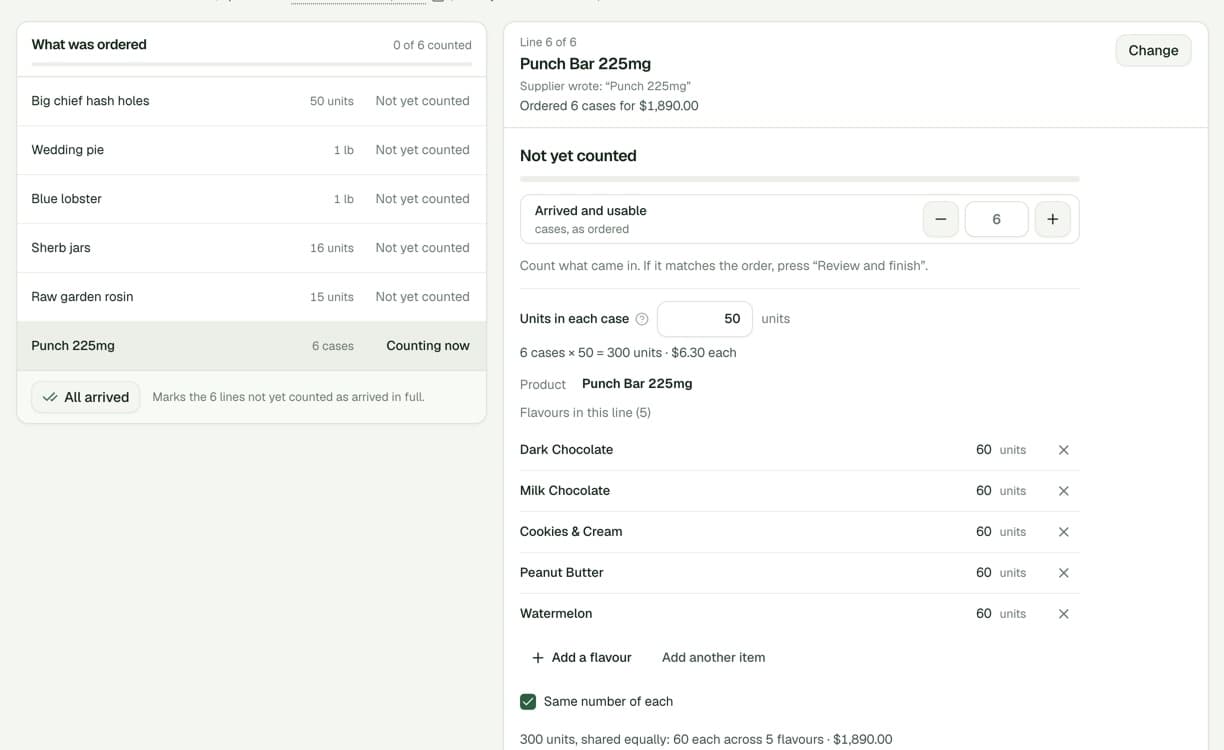
- Receive a mixed caseFor a line like six cases of 50 across five flavours, fill in Units in each case, then More than one flavour in this line? and pick the flavours. You get one lot per flavour, and the cost is shared out to the cent.
- Sell some, then look at the orderSell part of what arrived, or use it in a production run. The purchase order still shows what you ordered and what you paid for it.
- Paste from the same supplier againThe next list from a supplier whose delivery you have checked in comes back already matched, line by line.
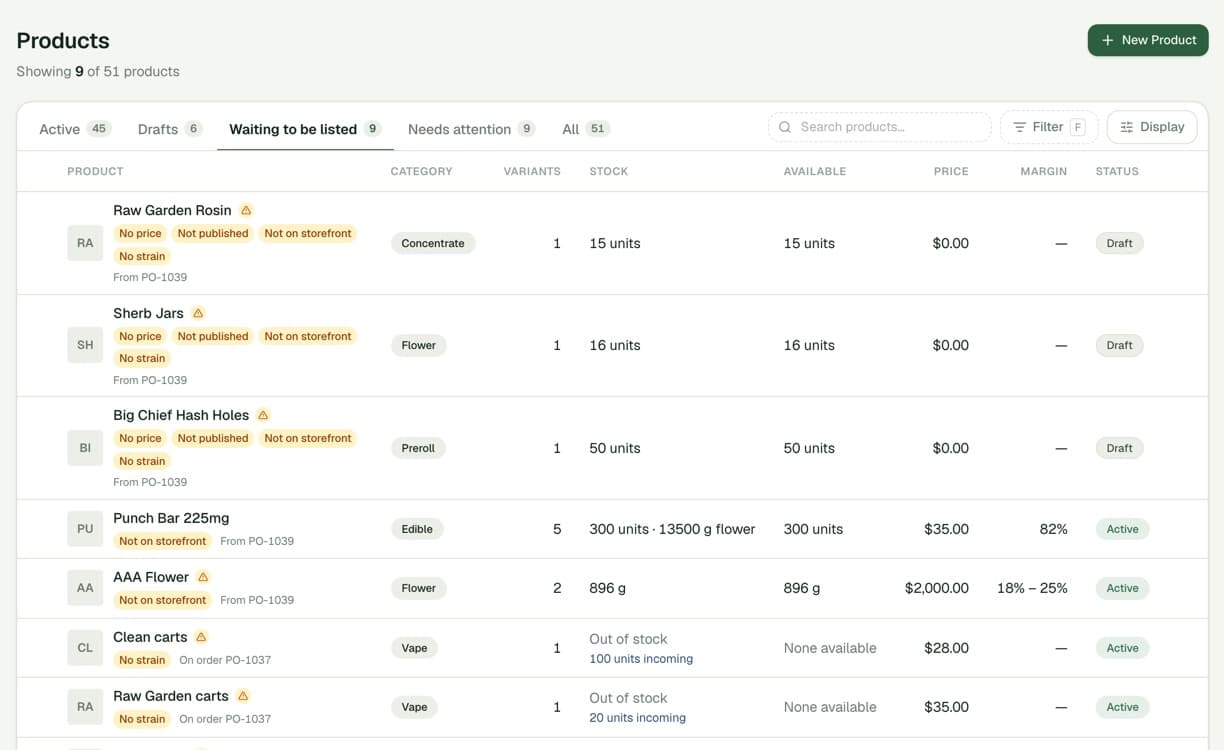
- List what came inProducts → Waiting to be listed shows everything that arrived but is not on sale yet: no price, not published or not on the storefront. Home tells you how many are waiting.
Purchase orders keep your supplier’s words
Until now, placing an order added a product for every line we did not recognise. One list could leave a dozen near-duplicates in Products, and there was no way to say that “sticky grapes” was really a new strain of a product you already sell.
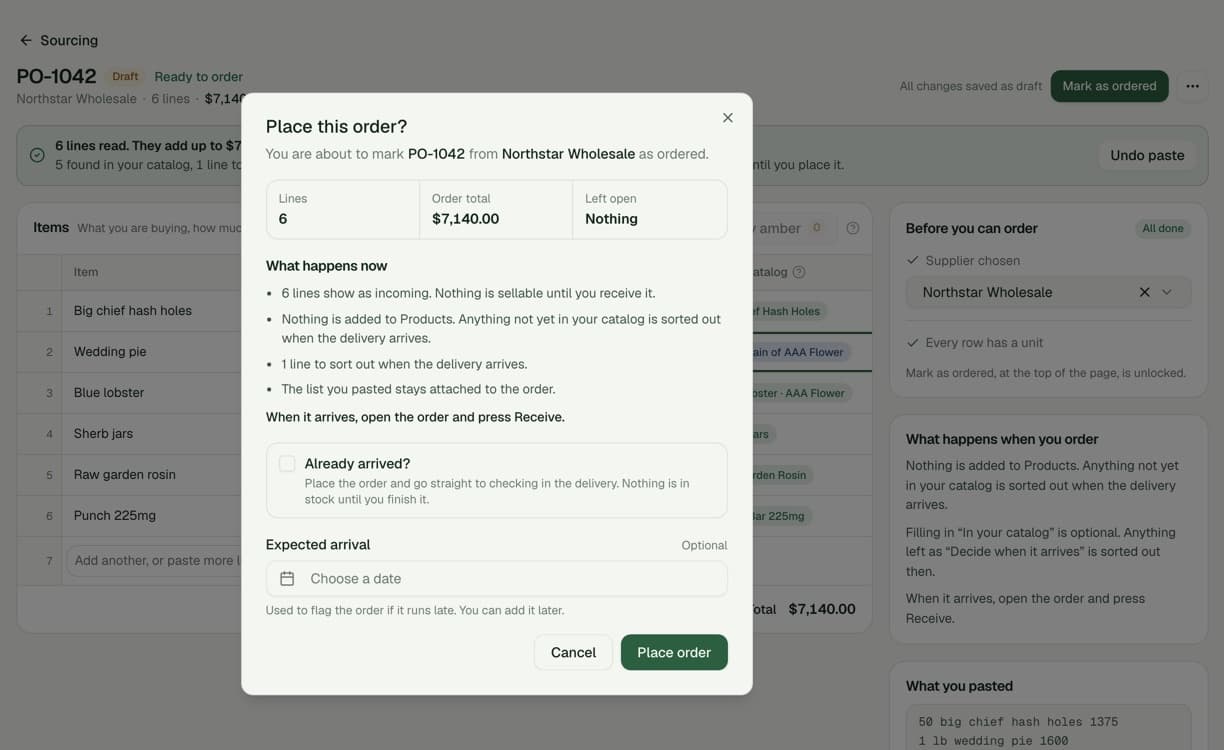
- Placing an order adds nothing to Products. The order holds your supplier’s words, the quantity, the unit and what you paid. Products are only created when the delivery is checked in, and only once you have said what each line is.
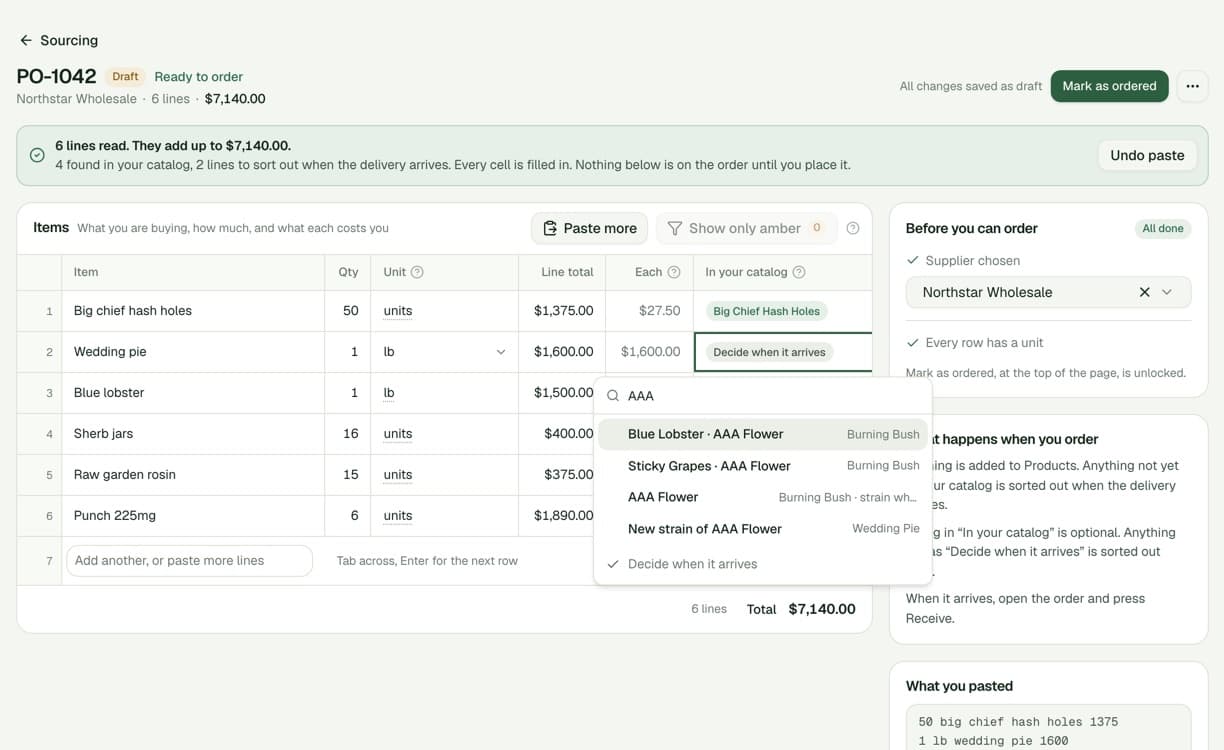
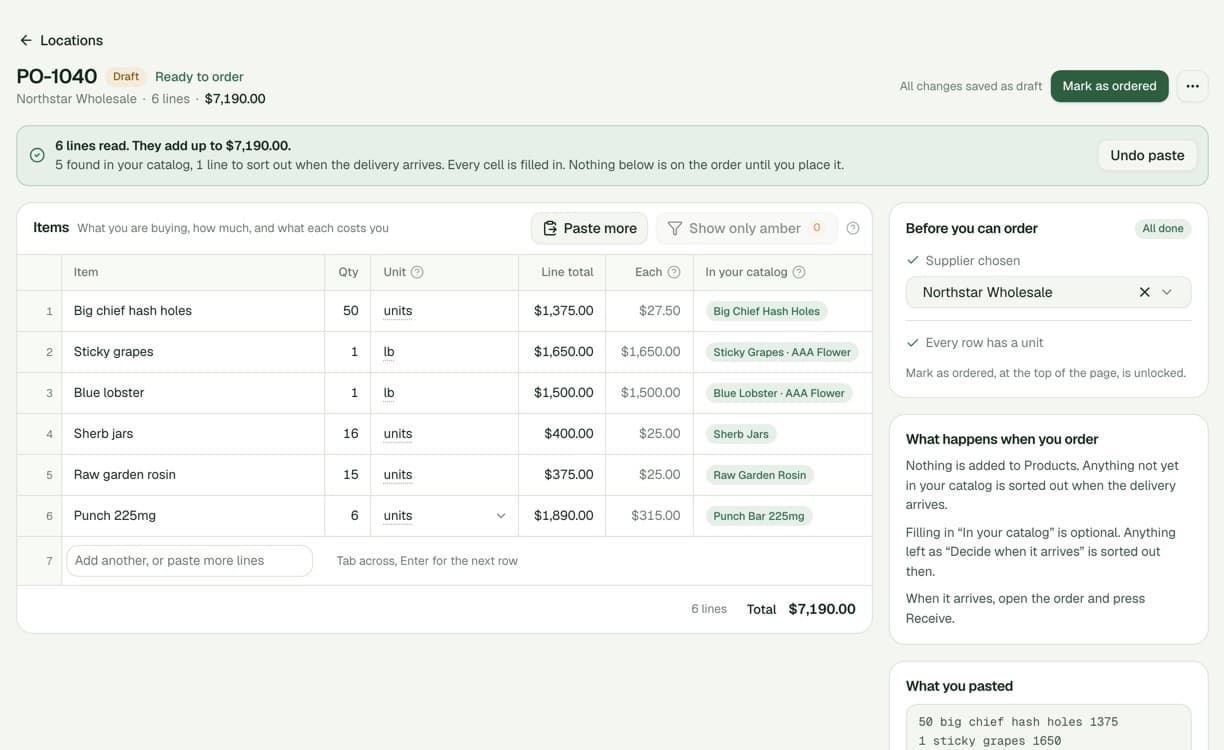
- An In your catalog column, which never stops you. Lines we recognise are found in your catalog as you paste. Anything else can be picked now or left as Decide when it arrives. A guess shows as Maybe, as a hint rather than something to fix.
- Your words are never rewritten. Matching a line no longer replaces what your supplier wrote. Change the wording and a match we guessed is dropped; a match you chose yourself is kept.
- Boxes, cases and packs are units. Write “6 box” or “1 case of 50” and the order keeps it that way, including how many are in each, so the delivery does not have to ask.
- Already arrived? Tick it when you are entering an order that is already in the building. The order is placed and the delivery opens straight away.
- Supplier memory comes from deliveries. What a supplier calls an item, and how they pack it, is now remembered when a delivery is checked in, not when an order is placed. It is learned from what really arrived.
Reading a pasted list
- A Price, Cost or Each column is the price of one. It used to be taken as the line total. A price under 50 cents each is marked amber in case it is a typo.
- A size on the line beats the usual unit. “10 28g Lemon Dior” is ten 28g bags, not ten pounds, and a dose like 225mg is never read as a weight.
- Carts, pods and pre-rolls never match flower. A cart that shares a strain name with your flower is no longer matched to the flower.
- Total, tax, shipping and discount rows are skipped. They are shown as skipped, with the reason, instead of becoming items.
- More list shapes are read. Lists without a header row, lists split by pipes, commas or emoji, and a strain written in its own column.
- Long lists are quick. A 300-line list against a catalog of 5,000 products reads in about a twentieth of a second, down from four.
- Edits are not lost. A row the server refuses no longer stops the rest from saving; it is marked with the reason. Leaving the page saves first, and asks before you lose anything that could not be saved.
Checking in a delivery
- Plain words, and a ? where it helps. Each line leads with what it is in your catalog, with your supplier’s words underneath. Strain is said for flower, pre-rolls, vapes and concentrates, and flavour for edibles. Tap a ? for a one-line explanation, on a tablet or phone too.
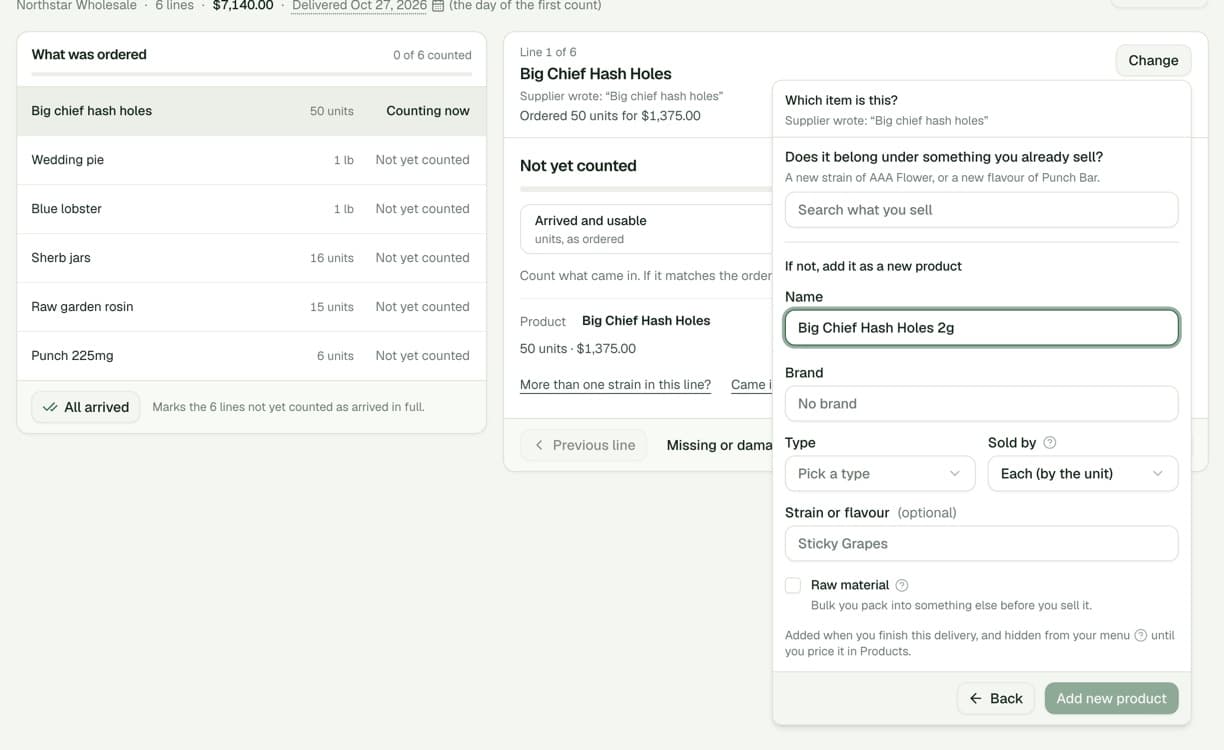
- Which item is this? One picker on every line: what you already sell, with what this supplier sent last time first. Or add it as new: first, does it belong under something you sell (a new strain of AAA Flower, a new flavour of Punch Bar)? If not, it becomes a new product under your own name.
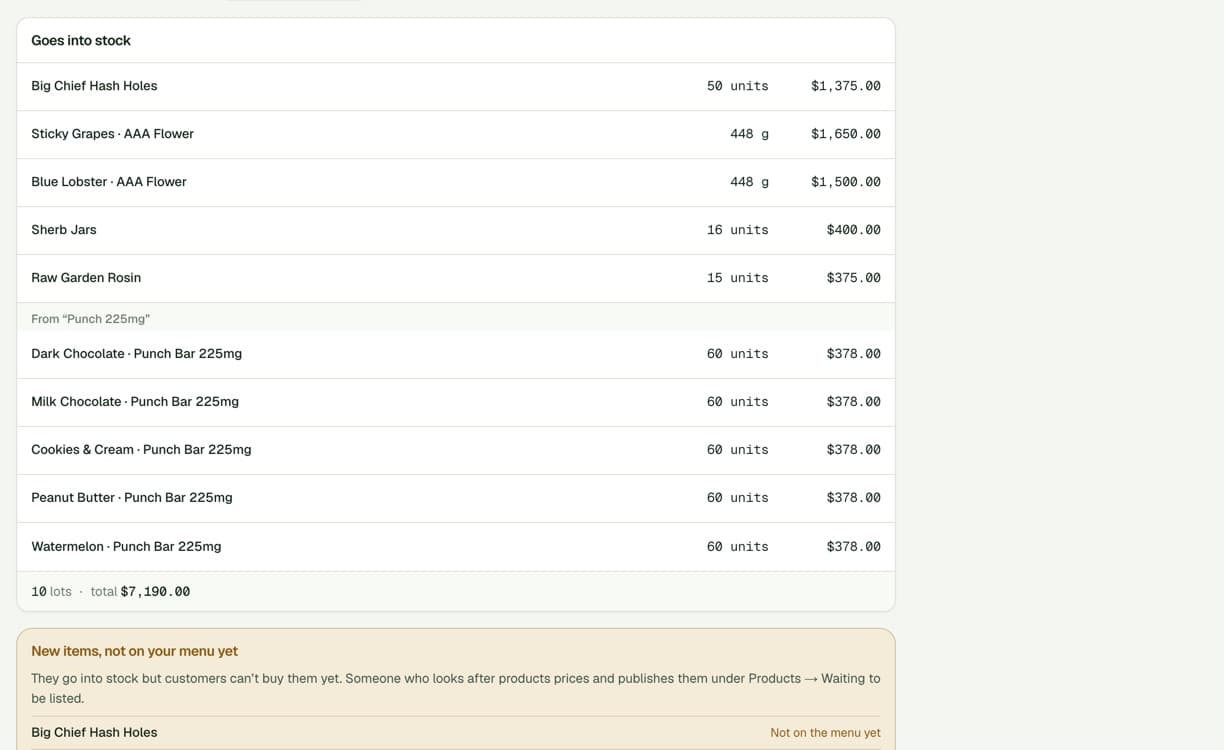
- New things come in unlisted. A new strain or product created at the delivery is in stock straight away but not on sale. It waits in Products → Waiting to be listed for someone to price and publish it.
- Cases and mixed cases. A line bought by the case asks Units in each case and shows the sum (6 cases × 50 = 300 units). More than one flavour in this line? shares it across the flavours that came in, the same number of each unless you count them. Each flavour becomes its own lot, and the cost of the line is shared across them exactly.
- Review before you finish. One row per lot that will be created, with its cost, the new items not on your menu yet, and anything damaged. Add to stock is the one step that cannot be undone; after it, the delivery stays on the order as a receipt you can open.
- An order can arrive in parts. Finish now, with lines still to come, checks in what you counted and leaves the rest open for the next delivery. Nothing is ever received at the ordered amount without a count.
- Missing and damaged are kept apart. Missing is what never arrived. Damaged arrived but is not sellable, is not added to stock and carries no cost. Both are under Missing or damaged? on each line.
- Two people counting the same order. If someone else changed a line while you were counting it, you are asked whether to use theirs or keep yours, instead of one quietly overwriting the other.
- The delivery date is yours to set. It follows the day you start counting until you change it.
- Your stock team can check in deliveries. Anyone who can adjust stock can now receive, without needing permission to edit orders or the catalog.
- Deliveries are only received from the delivery screen. The Sourcing list no longer offers Delivered as a status. A finished delivery is not undone; correct a mistake with Adjust stock.
What a purchase order is worth
One record used to be the order line, the lot that arrived and the part that was sold, all at once. Selling 25 pods of a $3,100 order moved the order to $3,445.
- What you ordered and what arrived are kept separately. Selling, production, write-offs and moving stock never change a purchase order. It shows what you ordered and what each delivery was booked at.
- Each lot knows its exact cost. Splitting a lot, by selling part of it or using it in production, shares its cost exactly, so nothing drifts by a cent.
- An order is cancelled only before anything has arrived. Once a delivery has been checked in, close what is still to come instead.
- Production runs belong to production. Lots made in a run no longer carry the purchase order of what went into them.
Products
- Waiting to be listed. A new tab in Products for everything in stock or on order that cannot be sold yet, with chips that say why: No price, Not published, Not on storefront, No strain. Each row names the purchase order it came from. Raw materials are left out.
- No more duplicate names. Two products with the same name and brand in one location are refused, and you are pointed to the one that already exists. A close match only warns. Existing duplicates were renamed “(2)” rather than removed.
- Move into another product. Turn a stray product into a strain of the product it belongs under, or merge two duplicates. Stock, lots, cost and history move with it.
- Add to purchase order. The product page’s Add Inventory is now Add to purchase order. For stock you already hold, use Adjust stock.
If a delivery will not check in the way it arrived, tell us what was in the box.